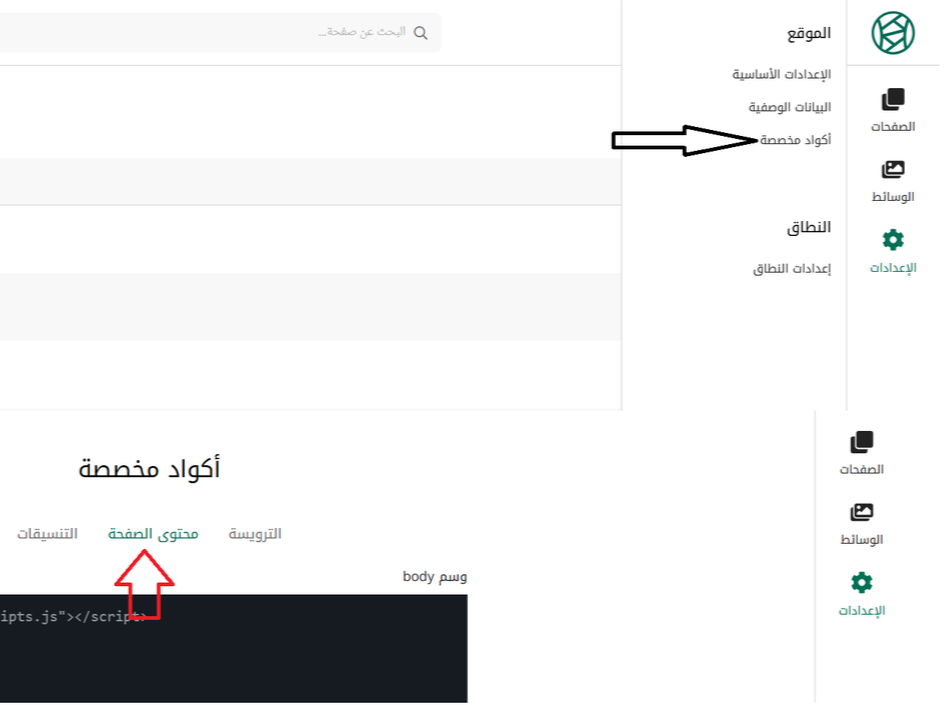
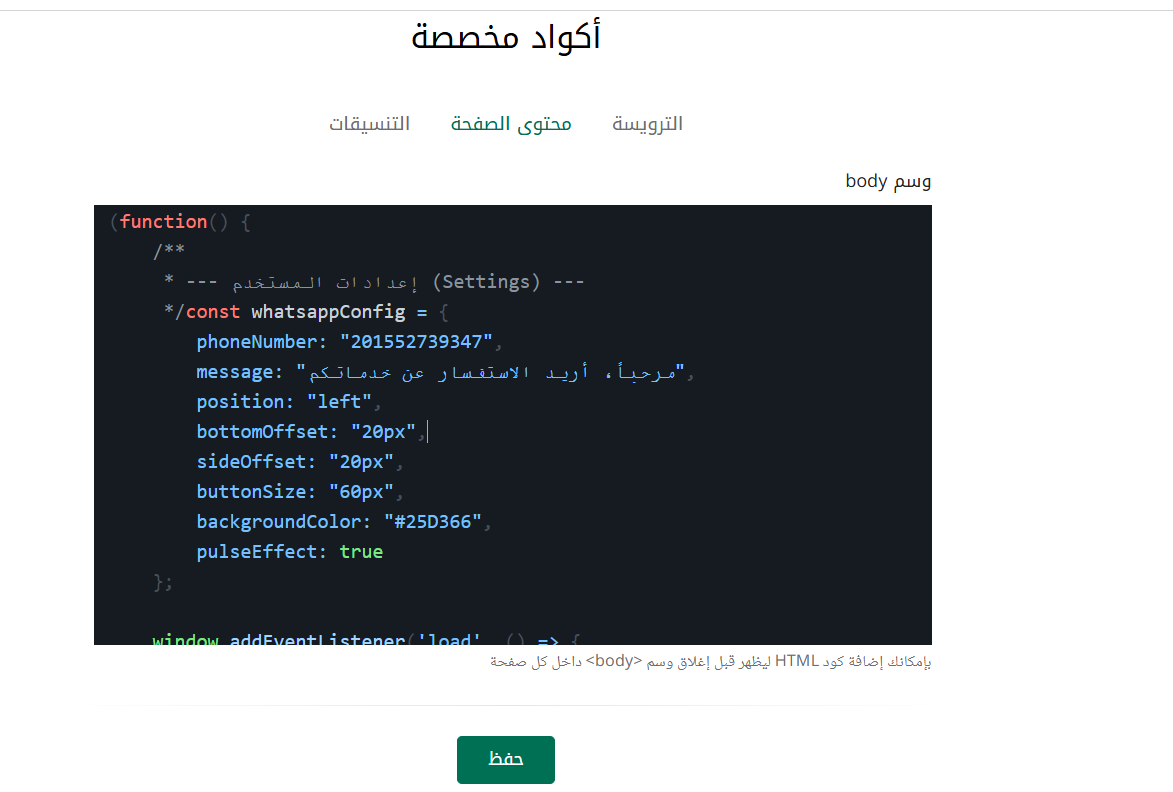
<script>
(function() {
    /**
     * --- إعدادات المستخدم (Settings) ---
     */
    const whatsappConfig = {
        phoneNumber: "201000000000",       // رقم الهاتف (بكود الدولة بدون + أو أصفار)
        message: "مرحباً، أريد الاستفسار عن خدماتكم", // الرسالة الافتراضية
        position: "right",                 // المكان: 'right' أو 'left'
        bottomOffset: "20px",              // المسافة من الأسفل
        sideOffset: "20px",                // المسافة من الجانب (يمين أو يسار)
        buttonSize: "60px",                // حجم الزر
        backgroundColor: "#25D366",        // لون الزر (لون واتساب الرسمي)
        pulseEffect: true                  // تفعيل تأثير النبض الجذاب
    };

    // التأكد من تمام تحميل الصفحة
    window.addEventListener('load', () => {

        // 1. إنشاء عنصر النمط (CSS) لإعطاء المظهر العصري
        const style = document.createElement('style');
        style.textContent = `
            .wa-float-btn {
                position: fixed;
                bottom: ${whatsappConfig.bottomOffset};
                ${whatsappConfig.position}: ${whatsappConfig.sideOffset};
                width: ${whatsappConfig.buttonSize};
                height: ${whatsappConfig.buttonSize};
                background-color: ${whatsappConfig.backgroundColor};
                color: white;
                border-radius: 50px;
                text-align: center;
                box-shadow: 2px 5px 15px rgba(0,0,0,0.3);
                z-index: 9999;
                display: flex;
                align-items: center;
                justify-content: center;
                text-decoration: none;
                transition: all 0.3s ease-in-out;
                cursor: pointer;
            }

            .wa-float-btn:hover {
                transform: scale(1.1);
                box-shadow: 2px 5px 20px rgba(0,0,0,0.4);
            }

            .wa-float-btn svg {
                width: 60%;
                height: 60%;
                fill: white;
            }

            ${whatsappConfig.pulseEffect ? `
            .wa-float-btn::before {
                content: "";
                position: absolute;
                width: 100%;
                height: 100%;
                background-color: ${whatsappConfig.backgroundColor};
                border-radius: 50%;
                z-index: -1;
                animation: wa-pulse 2s infinite;
            }

            @keyframes wa-pulse {
                0% { transform: scale(1); opacity: 0.7; }
                100% { transform: scale(1.6); opacity: 0; }
            }
            ` : ''}
        `;
        document.head.appendChild(style);

        // 2. إنشاء رابط الواتساب (Anchor Tag)
        const waLink = document.createElement('a');
        const encodedMessage = encodeURIComponent(whatsappConfig.message);
        waLink.href = `https://wa.me/${whatsappConfig.phoneNumber}?text=${encodedMessage}`;
        waLink.target = "_blank";
        waLink.className = "wa-float-btn";
        waLink.setAttribute('aria-label', 'Contact us on WhatsApp');

        // 3. إضافة أيقونة SVG الخاصة بواتساب داخل الزر
        waLink.innerHTML = `
            <svg viewBox="0 0 448 512">
                <path d="M380.9 97.1C339 55.1 283.2 32 223.9 32c-122.4 0-222 99.6-222 222 0 39.1 10.2 77.3 29.6 111L0 480l117.7-30.9c32.4 17.7 68.9 27 106.1 27h.1c122.3 0 224.1-99.6 224.1-222 0-59.3-25.2-115-67.1-157zm-157 341.6c-33.2 0-65.7-8.9-94-25.7l-6.7-4-69.8 18.3L72 359.2l-4.4-7c-18.5-29.4-28.2-63.3-28.2-98.2 0-101.7 82.8-184.5 184.6-184.5 49.3 0 95.6 19.2 130.4 54.1 34.8 34.9 56.2 81.2 56.1 130.5 0 101.8-84.9 184.6-186.6 184.6zm101.2-138.2c-5.5-2.8-32.8-16.2-37.9-18-5.1-1.9-8.8-2.8-12.5 2.8-3.7 5.6-14.3 18-17.6 21.8-3.2 3.7-6.5 4.2-12 1.4-5.5-2.8-23.2-8.5-44.2-27.1-16.4-14.6-27.4-32.7-30.6-38.2-3.2-5.6-.3-8.6 2.4-11.3 2.5-2.4 5.5-6.5 8.3-9.7 2.8-3.3 3.7-5.6 5.5-9.3 1.8-3.7.9-6.9-.5-9.7-1.4-2.8-12.5-30.1-17.1-41.2-4.5-10.8-9.1-9.3-12.5-9.5-3.2-.2-6.9-.2-10.6-.2-3.7 0-9.7 1.4-14.8 6.9-5.1 5.6-19.4 19-19.4 46.3 0 27.3 19.9 53.7 22.6 57.4 2.8 3.7 39.1 59.7 94.8 83.8 13.2 5.7 23.5 9.2 31.6 11.8 13.3 4.2 25.4 3.6 35 2.2 10.7-1.6 32.8-13.4 37.4-26.4 4.6-13 4.6-24.1 3.2-26.4-1.3-2.5-5-3.9-10.5-6.6z"/>
            </svg>
        `;

        // 4. إضافة الزر إلى جسم الصفحة
        document.body.appendChild(waLink);
    });
})();
</script>